




August 16, 2026 Where Was Your Imaging Sensor Made, and What Is It Talking To? Device Provenance Is Now a Dental Practice Security Question
Most of the security stories a dental practice hears about arrive through the front door of the internet: a phishing email, a ransomware gang, a stolen password. But one of the most unsettling advisories of the past year was about something already sitting quietly on hospital networks – a device doing exactly what it appeared to do, while secretly doing something else as well.
In early 2025, the U.S. Cybersecurity and Infrastructure Security Agency (CISA) and the Food and Drug Administration warned that a widely used patient monitor, the Contec CMS8000, contained a hidden backdoor in its firmware. According to CISA’s analysis, affected versions would silently transmit patient data in plaintext to a hard-coded external IP address and could allow remote control of the device – tracked as CVE-2025-0626, CVE-2025-0683, and CVE-2025-1204. This was not a stolen password or a misconfiguration. It was behavior baked into the device before it ever reached a clinic.
The response has been spreading ever since. By March 2026, the state of Texas had directed its agencies and state-owned medical facilities to inventory and review the cybersecurity risk of Chinese-manufactured networked medical devices, reporting their findings to a central cyber command. Whatever you make of the geopolitics, the underlying question it forces is a good one for every healthcare organization – dental practices included: do you actually know what your connected devices are, and what they are talking to?
Your practice is full of connected devices too
It is easy to read “medical device backdoor” and assume it is a hospital problem. It is not. A modern dental practice is quietly full of networked hardware running embedded firmware from a global supply chain: intraoral sensors and their interface bridges, panoramic and CBCT imaging units, intraoral scanners, sometimes networked sterilizers, monitoring gear, and the little boxes that connect them all to your practice-management software.
Each of those is a small computer. Each has firmware written by someone, assembled from components sourced from somewhere, and each – once you plug it into your network – is trusted. That trust is the whole point of the Contec story. A firewall is very good at stopping threats coming in; it is far less suspicious of a device already inside the practice quietly sending data out to an address it was programmed to reach.
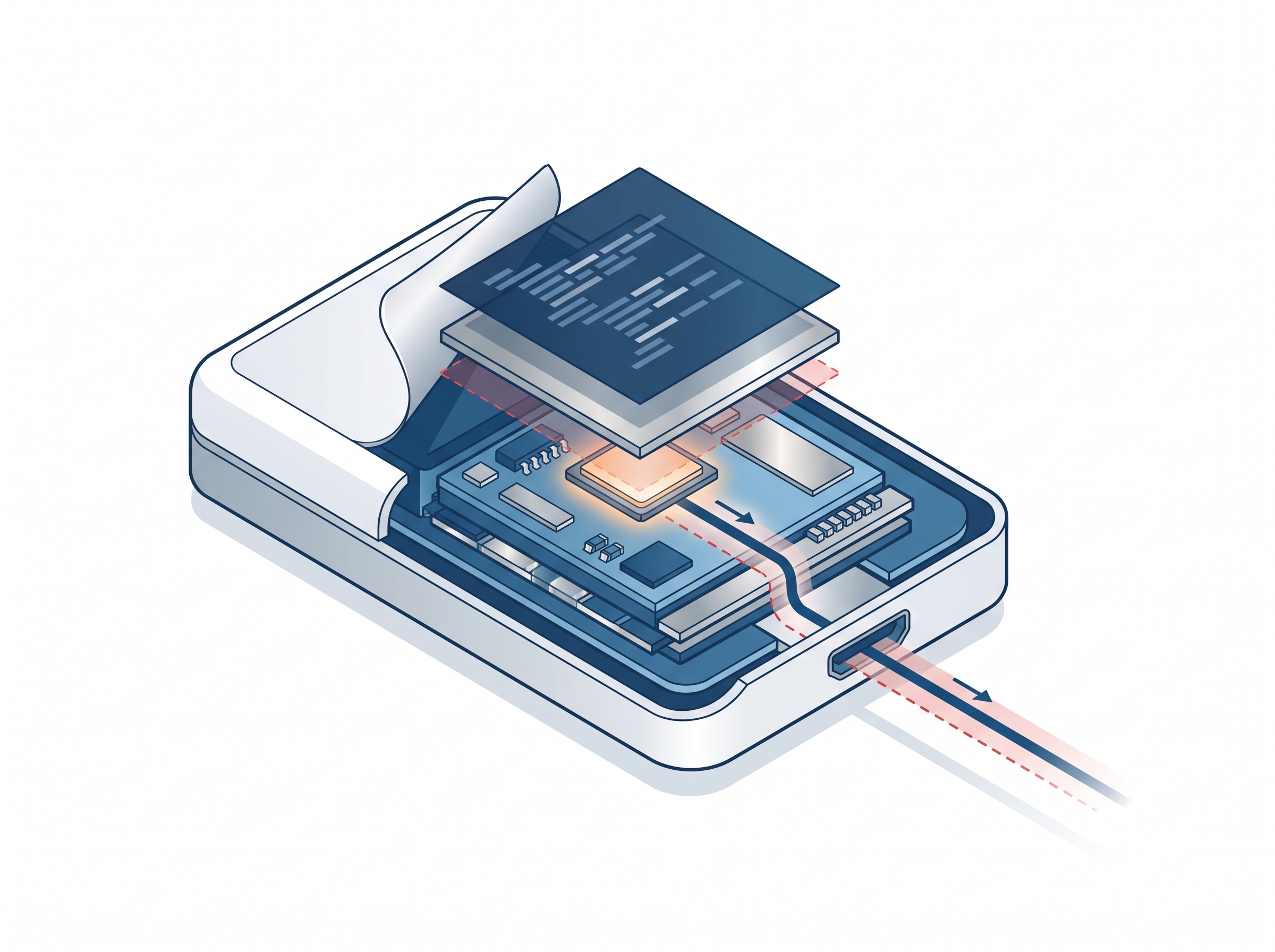
This is the same lesson, from a different angle, as the imaging-file and software risks we have covered before. When we looked at a booby-trapped X-ray file exploiting a flaw in DICOM viewing software, the danger was trusted imaging software. When we looked at malicious code slipped into a software supply chain, the danger was trusted software components. Device provenance is the hardware version of the same problem: the thing you trusted was compromised before you ever received it.
Provenance is a real question, not paranoia
To be clear, the point here is not to panic about any single country of origin, or to rip trusted equipment out of your operatories. Plenty of excellent imaging hardware is manufactured overseas, and country of manufacture alone does not make a device dangerous. The point is narrower and more useful: provenance and behavior are now legitimate things to know and monitor. Who made this device? What firmware is it running? What does it connect to, and does it reach anything outside your practice? Has the manufacturer committed to patching it?
Those were once questions nobody asked when buying a sensor. After a hard-coded backdoor in a mainstream patient monitor and a state-level order to catalog networked medical devices, they are exactly the questions a diligent practice – and its regulators – will increasingly expect answered.
What to actually do about it
The reassuring part is that the defenses are practical, and most of them are good hygiene regardless of any single advisory.

Build a device inventory. You cannot secure what you have not listed. Create a living register of every networked device in the practice: make, model, firmware version, what it connects to, and whether it needs internet access at all. This single unglamorous document is the foundation for everything else, and it is exactly what the Texas directive asked its agencies to produce.
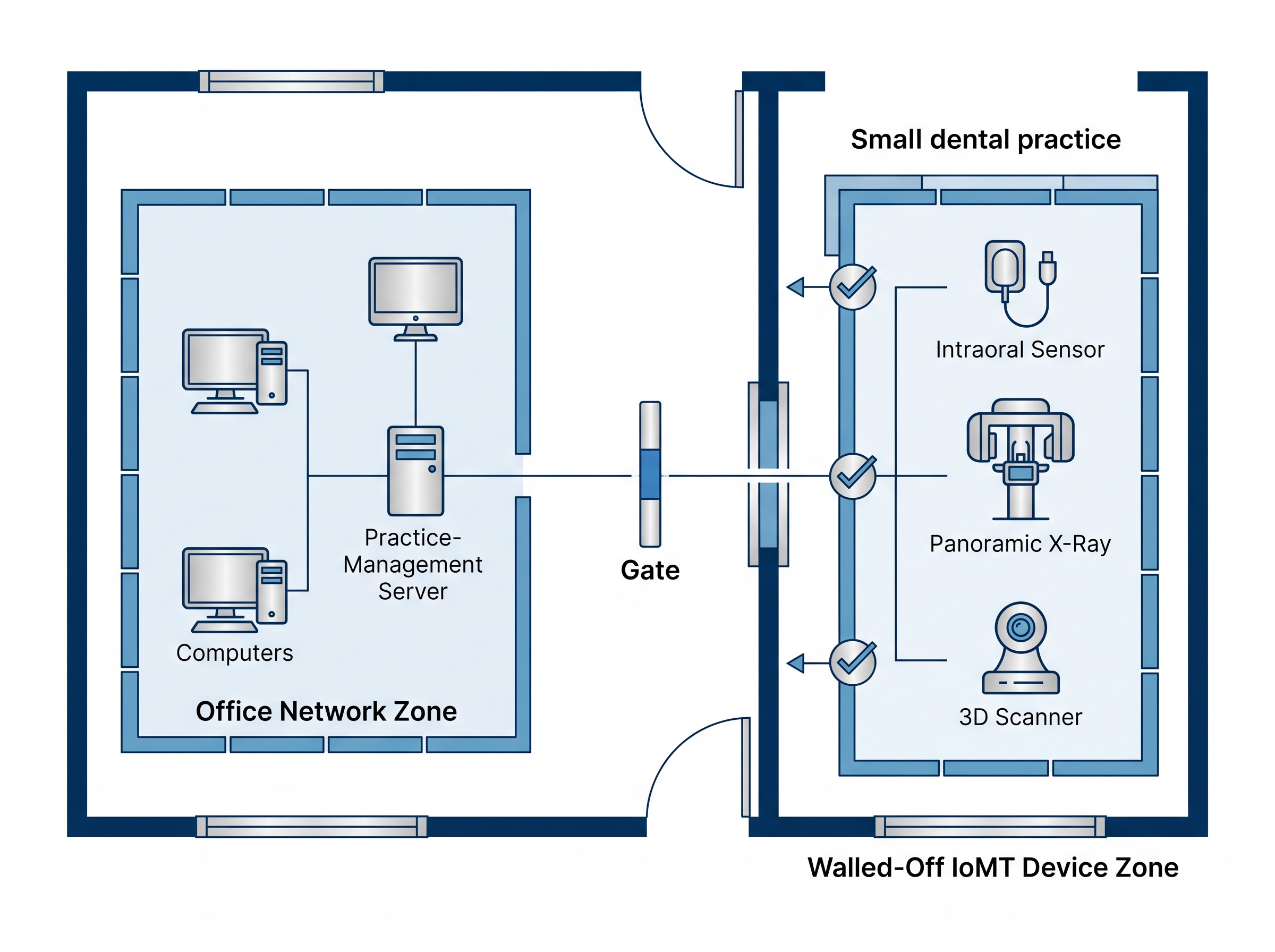
Segment your imaging and connected devices. Put imaging units and other connected medical devices on their own isolated network segment (a VLAN), separated from front-desk computers and your practice-management server, with tightly controlled rules about what they may talk to. If a device only needs to reach your imaging server, it should not be able to reach the open internet at all. Segmentation is what turns “a compromised sensor” into a contained event rather than a practice-wide one.
Watch what your devices send outward. Egress monitoring – keeping an eye on outbound connections from your network – is how a device “phoning home” to an address it has no business contacting gets noticed. Your IT support can flag and block unexpected outbound traffic from devices that should be silent.
Keep firmware patched, through the vendor. Backdoors and bugs get fixed in firmware updates. Establish who is responsible for checking for and applying firmware updates on each device, and confirm the manufacturer still supports the model. A device the vendor has abandoned is a device that will never be fixed.

Make provenance a purchasing criterion. Before buying connected equipment, ask the vendor the awkward questions: where does this device send data, can you provide a software bill of materials (a list of the components inside it), and how long do you commit to security updates? Vendors who answer clearly are the ones you want. This is the same third-party diligence we laid out in our IoMT and vendor-breach checklist – applied at the moment of purchase, when you have the most leverage.
Fold devices into your risk assessment. Under PHIPA and HIPAA, connected devices that touch patient data belong in your written risk assessment and incident-response plan – not as an afterthought, but as the small computers holding and moving PHI that they actually are.
The takeaway
A patient monitor that quietly mailed patient data overseas, and a state government ordering a full inventory of its networked medical devices, are two halves of the same wake-up call. The devices we plug in and forget about are computers, made by people, somewhere, running code we usually never see. That does not mean fear every sensor – it means know your equipment, contain it, and watch it.
Compudent Systems helps dental practices across the GTA and Ontario answer these questions in practice: building a complete inventory of connected and imaging devices, segmenting them onto isolated networks with controlled egress, monitoring for the outbound traffic a compromised device would generate, and folding all of it into a defensible PHIPA and HIPAA risk assessment. If you could not, right now, list every networked device in your practice and say what each one connects to, that is the place to start – contact Compudent Systems for a connected-device and network review.
Sources & further reading:
- Contec CMS8000 Contains a Backdoor – CISA fact sheet
- Contec Health CMS8000 Patient Monitor (Update A) – CISA ICS Medical Advisory ICSMA-25-030-01
- Governor Abbott Directs State Health Agencies to Address Potential CCP-Connected Cybersecurity Risks – Office of the Texas Governor
Related Reading
- When Your Device Vendor Gets Breached: An IoMT and Third-Party Security Checklist for Dental Practices
- The Other Computers in Your Operatory: Why Connected Dental Devices Are the Attack Surface Nobody Audits
- You Can’t Patch That Old Sensor or CBCT: How to Safely Keep Legacy Imaging Devices on Your Dental Network