




January 21, 2026 When Your Device Vendor Gets Breached: An IoMT and Third-Party Security Checklist for Dental Practices
The most important detail of the Medtronic breach is the one that is easiest to miss. When ShinyHunters accessed Medtronic corporate IT systems over a handful of days in April 2026 and made off with the personal and health information of roughly 3.8 million people, the devices themselves were never the point of entry. Pacemakers, pumps, and monitors kept working; the company reported no evidence that product security or patient safety was affected. What was breached was the manufacturer’s corporate network – the ordinary business systems where names, contact details, dates of birth, Social Security numbers, and health data happened to sit. We covered the incident itself in our earlier report, Medtronic Data Breach by ShinyHunters. This is the companion piece: not the news, but the checklist.
For a dental practice, that distinction splits your risk cleanly in two. The first risk is the one the Medtronic story actually demonstrates – a vendor you rely on gets breached, and because they hold or can reach your patients’ data, their breach becomes yours. The second is the risk everyone thinks of first: the networked medical devices in your own operatory, which are computers that still need securing regardless of what any manufacturer does. A practice that manages only one of these is exposed on the other. Here is how to work both.
Part 1: The vendor is your attack surface too
You did not have to be a Medtronic customer to appreciate the lesson. Every dental practice depends on a web of outside companies that hold, process, or can reach patient data: the practice-management software vendor, the imaging-software provider, the cloud backup service, the billing or revenue-cycle company, the email and file-sharing platform, and the device manufacturers who provide remote support. Each of them is a door into your patients’ information that you do not directly control – and, as Medtronic showed, a breach on their side spills your patients’ data whether or not anything in your building was ever touched.

The uncomfortable truth is that you can harden your own network flawlessly and still suffer a reportable breach because a supplier did not. That is exactly why third-party risk cannot be an afterthought.
Build a vendor and data-flow inventory
You cannot protect data you have never mapped. Start by listing every outside company that stores, processes, or can access your patient information, and for each one write down what data they hold, how they connect to you, and how they would notify you of a breach. The exercise is nearly always eye-opening – practices routinely find patient data resting in more places, and in more vendors’ hands, than anyone assumed.

With the map in front of you, the priorities sort themselves: the vendor holding full records with identifiers matters more than the one that sees a name and an appointment time, and a service that reaches into your network deserves more scrutiny than one that only receives an occasional export.
Set requirements, then verify them
Once you know who holds what, put expectations in writing and check them. Under PHIPA, an outside company handling patient information on your behalf is your responsibility to oversee, so a written agreement covering security safeguards, breach-notification timelines, and data handling is not paperwork for its own sake – it is the mechanism that obliges a vendor to tell you promptly when something goes wrong. Ask each significant vendor how they protect data, whether they encrypt it at rest and in transit, how they control and log access, and how quickly they commit to notifying you of an incident. A vendor who answers clearly is one you can manage; one who deflects is telling you something before it costs you.
Part 2: Secure the devices, because they are still computers
The Medtronic breach did not come through a device – but that is no reason to leave your own devices open, because plenty of attacks do. Wireless medical device vulnerabilities surface in security advisories with grim regularity, and the networked imaging sensors, cone-beam and panoramic units, intraoral scanners, monitors, and peripherals in your operatory are full computers with operating systems, firmware, and network connections. This is the Internet of Medical Things (IoMT), and it needs the same discipline you give your PCs.
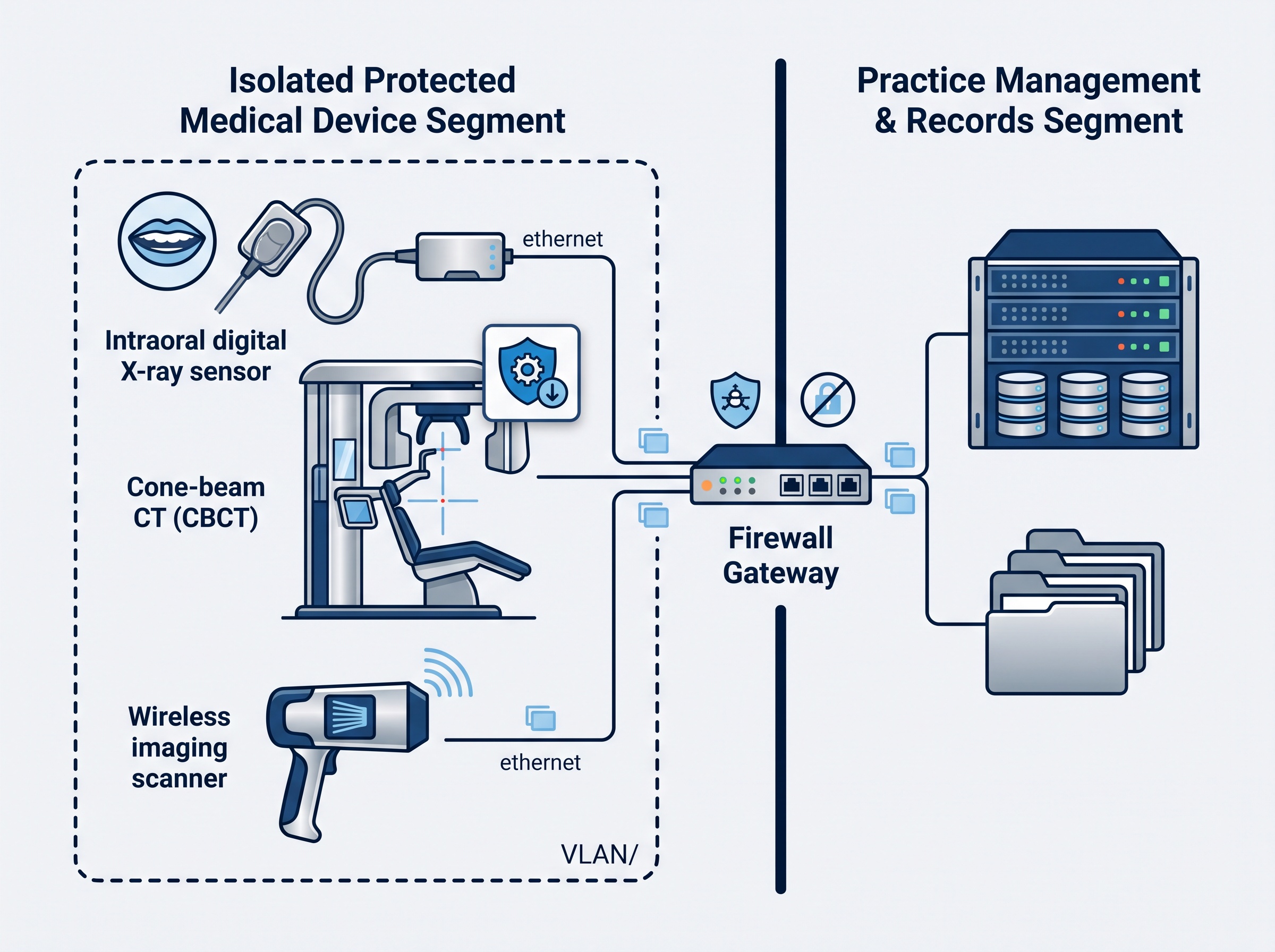
Three controls carry most of the weight. Inventory every connected device – what it is, what firmware it runs, whether that version is still supported, and what it talks to – because a device you have never listed is a risk you cannot see. Segment the network so imaging hardware and smart devices live on their own VLAN, separated by a firewall from the practice-management server and patient records; then a compromise of one gadget cannot reach everything. Change default credentials and keep firmware current, treating vendor security updates and end-of-life notices as a scheduled maintenance item rather than an afterthought – tracking the CVEs that apply to your specific devices so a known, patchable flaw does not sit open for months. These steps are defense in depth: they hold the line even on the day a vendor slips.
Part 3: Have a plan for the day the notice arrives
Breaches at large suppliers are now routine enough that every practice should assume it will one day receive a notice like Medtronic’s. What separates a controlled response from a scramble is deciding the steps in advance.

When a vendor announces a breach, work a short, prepared runbook. Confirm your exposure – ask the vendor directly whether your practice or your patients’ data was among the affected, and what specific fields were involved. Preserve the notice and all correspondence, because you may need the record. Assess your own obligations: if patient information you are responsible for was exposed, PHIPA may require you to notify affected individuals and, in some cases, the Information and Privacy Commissioner of Ontario – a determination worth making quickly and, where the stakes are high, with professional advice. Rotate any credentials your practice shared with or through that vendor. And brace for the second wave: stolen names, contact details, and health data feed convincing phishing and impersonation attempts, so warn your team to treat unexpected calls and emails referencing the breach with suspicion. A plan you wrote on a calm afternoon is worth far more than good intentions on a bad morning.
Two risks, one program
The Medtronic breach is a clean illustration of a single point: your practice’s security perimeter now extends into every vendor that touches your patients’ data, even as the devices inside your own walls remain your responsibility to lock down. Manage the vendors and you close the door the Medtronic attackers actually walked through. Secure the devices and you close the door plenty of other attackers prefer. Prepare a response and you turn the inevitable bad-news email into a procedure instead of a panic. None of it requires an enterprise budget – it requires knowing who holds your data, keeping your own house in order, and having decided in advance what to do.
Compudent Systems helps dental practices across the GTA and Ontario run exactly this program – mapping the vendors and data flows that put patient information outside your walls, inventorying and segmenting the connected devices inside them, keeping firmware and credentials in order, and building an incident-response plan so a vendor’s breach does not become your crisis. If you cannot say today which outside companies hold your patients’ data, or which devices on your network last received a security update, contact Compudent Systems for a third-party and connected-device assessment. It is a far better thing to find on your own schedule than on an attacker’s.
Sources & further reading:
- Medtronic Notifies 3.8 Million After ShinyHunters Data Breach
- Medtronic Data Breach by ShinyHunters: Critical Warning for Medical Device Security in Dental Practices (Compudent)
Related Reading
- Where Was Your Imaging Sensor Made, and What Is It Talking To? Device Provenance Is Now a Dental Practice Security Question
- The Other Computers in Your Operatory: Why Connected Dental Devices Are the Attack Surface Nobody Audits
- Medtronic Data Breach by ShinyHunters: Critical Warning for Medical Device Security in Dental Practices