




August 9, 2026 One Ordinary Login Can Now Own Your Whole Network: What the ‘Certighost’ Windows Domain Exploit Means for Dental Practices
Every dental practice that runs a Windows server quietly depends on one assumption: that an ordinary staff login can only do ordinary things. A front-desk account can open the schedule and read a chart, but it cannot rewrite the network, seize the server, or hand an attacker the keys to everything. A newly public exploit named Certighost breaks that assumption. It lets a single low-privileged, authenticated user take over an entire Windows domain – no administrator password, no missing lock, just a feature of Windows most practices did not know they had switched on.
Microsoft has already patched the underlying flaw, tracked as CVE-2026-54121, as part of its July 2026 Patch Tuesday – a record batch of 622 fixes. But in late July, security researchers released a working proof-of-concept exploit, which moves this from a theoretical advisory to a tool anyone can run. For any practice that has not yet applied that update, the window between “patch available” and “exploit public” has now closed. Here is what changed, and the short list of what to do about it.
What Certighost actually does
The flaw lives in Active Directory Certificate Services (AD CS) – the part of Windows Server that issues the digital certificates a network uses to prove identity. In a normal setup, AD CS is meant to hand out modest certificates to ordinary users and machines. Certighost lets an attacker abuse that process so that an everyday domain account requests a certificate that lets it authenticate as something it is emphatically not: a Domain Controller, the machine that governs the entire network.
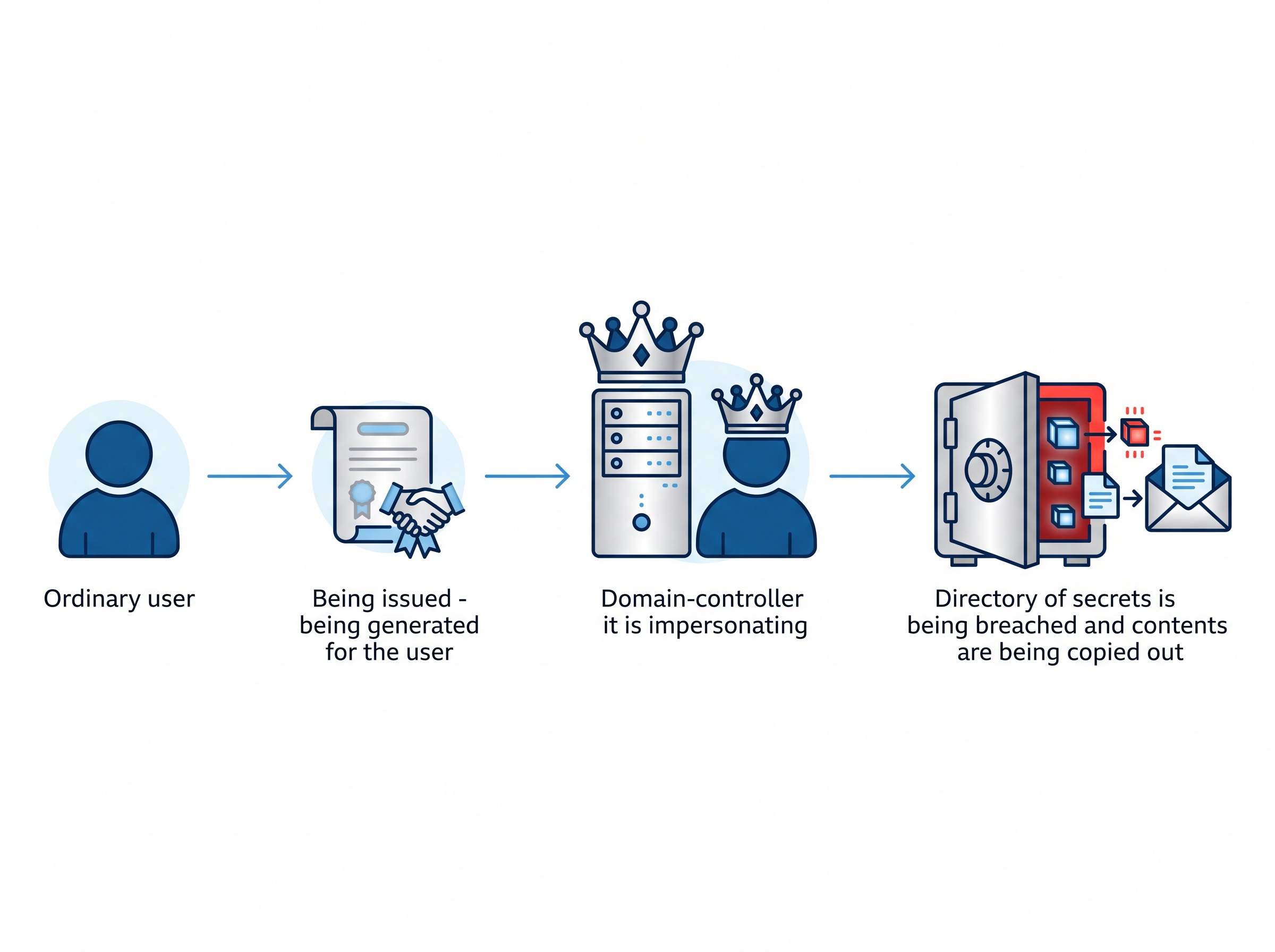
Once an attacker can pose as a domain controller, the game is effectively over. Domain-controller accounts carry directory-replication rights, which the attacker uses to copy the domain’s most sensitive secret – the master credential every Windows account is derived from. With that in hand, they can mint access to any account they like, including full administrator, and move through the network at will. The researchers who found it, Aniq Fakhrul and Muhammad Ali, demonstrated the whole chain starting from a plain, unprivileged user. That is what makes it dangerous: the starting point is not a stolen admin password. It is any login at all.
Why “any authenticated user” is a low bar
It is tempting to read “the attacker needs an authenticated account” as reassuring. It is not. In a dental practice, an authenticated account is simply any staff member’s Windows login – and there are several ways an attacker gets one. A single phishing email that captures a hygienist’s or receptionist’s password is enough. So is a weak or reused password sprayed against your remote-access portal, or a former employee’s account that was never disabled. None of these give an attacker anything special on their own; that is exactly why they are common and often overlooked. Certighost turns one of those ordinary footholds – the kind that used to mean limited damage – into a straight path to owning the entire network.
What full domain takeover means in a clinical setting
Abstract exploits deserve concrete stakes. When an attacker controls your domain controller, they control every computer joined to it: the front-desk workstations, the operatory PCs, the imaging server, and the file shares where radiographs and patient records live. In practice, that is the launch position for the worst days a practice can have.

From there, an attacker can deploy ransomware to every machine simultaneously rather than one at a time, encrypting your entire practice in minutes. They can exfiltrate protected health information wholesale, creating a reportable PHIPA breach with all the notification duties that follow. And they routinely go looking for your backups first – because backups reachable from the network can be deleted or encrypted along with everything else, turning a recoverable incident into an existential one. A domain compromise is not one problem; it is the master key to all of them.
What to do now
The good news is that the response is well-defined and does not require an enterprise budget – it requires acting deliberately on a handful of items.
Apply the updates. The single most important step is installing Microsoft’s July 2026 (and all subsequent) security updates on every Windows Server, especially any acting as a domain controller. If you are not certain your server is current, that uncertainty is itself the finding – resolve it this week.

Find out whether AD CS is even running, and whether you need it. Many small practices have Active Directory Certificate Services enabled without ever having deliberately turned it on or using it for anything. A service you do not use is attack surface you do not need. Have your IT provider confirm whether AD CS is present, whether it is required, and if so, whether its certificate templates and enrollment settings are configured safely – the specific misconfigurations this class of attack relies on are exactly what a review is meant to catch and lock down.
Shrink who can log in at all. Because the attack begins with an ordinary authenticated account, everything that reduces the odds of an attacker holding one helps: enforce multi-factor authentication on remote access and email, retire dormant and former-staff accounts, insist on strong unique passwords, and follow least privilege so no account carries more rights than the job needs.
Watch, and keep a way back. Ask whether your systems can flag the abnormal certificate requests and directory-replication activity this attack produces, so an attempt is noticed rather than silent. And confirm you have offline, tested backups – copies an attacker who owns the domain cannot reach and destroy. If containment ever fails, that disconnected, verified backup is the difference between a bad week and a closed practice.

The takeaway
Certighost is a clean illustration of a modern truth: the gap between a low-value foothold and total compromise keeps shrinking, and the features that close it are often ones you did not know were running. The flaw is patched – which means the practices that get hurt will overwhelmingly be the ones that simply never applied the update or never checked their configuration. Neither is a technology problem. Both are a follow-through problem.
Compudent Systems helps dental practices across the GTA and Ontario close exactly these gaps – confirming your servers are patched against Certighost and the rest of July’s fixes, determining whether Active Directory Certificate Services is running and hardening or removing it, tightening account privileges and MFA so a single stolen login goes nowhere, and verifying you have offline backups that survive a worst case. If you cannot say today whether your practice server has this month’s updates, or whether AD CS is quietly enabled on it, contact Compudent Systems for a domain and patch assessment. It is a far better thing to learn on your own schedule than on an attacker’s.
Sources & further reading:
- New Certighost PoC exploit lets attackers hijack Windows domains (BleepingComputer)
- Certighost Exploit Lets Low-Privileged Active Directory Users Impersonate a Domain Controller (The Hacker News)
- ‘Certighost’ Flaw Haunts Microsoft Active Directory Certificates (Dark Reading)
Related Reading
- A Forged Login Walks Straight Into SharePoint: What the Actively Exploited CVE-2026-55040 Auth Bypass Means for Dental Practices
- Public Exploit Code Is Now Out for a Critical SCCM Flaw: What CVE-2026-47301 Means If Anyone Manages Your Practice’s Windows Fleet
- A Fake Job Offer, a Windows Kernel Rootkit: The Lazarus Zero-Day (CVE-2026-68820) and What It Means for Your Dental Practice