




October 2, 2026 A Flaw in the Guard at Your Inbox: The FortiMail Zero-Day (CVE-2026-104286) and What It Means for Your Practice
On October 2, Fortinet and the US Cybersecurity and Infrastructure Security Agency issued an urgent warning that most practice owners will never read — but that quietly affects the security equipment guarding a great many dental, medical, and business networks. A critical, previously unknown flaw in FortiMail, Fortinet’s email security gateway, is being actively exploited in the wild, and at the time of the warning a full patch for most affected versions was not yet available. There is a particular irony here worth sitting with: the device whose entire job is to keep dangerous email out had itself become the way in.
The flaw is tracked as CVE-2026-104286 and carries a CVSS severity score of 9.8 out of 10 — about as high as these ratings go. It affects the FortiMail management interface, and understanding why it is so dangerous does not require any Fortinet expertise at all.
What FortiMail is, and why this flaw is so serious
A secure email gateway like FortiMail sits in front of an organization’s mail, inspecting every incoming message for spam, phishing, malware, and malicious links before it ever reaches a staff inbox. For a dental practice, that is precisely the device standing between a receptionist’s inbox and the fake invoice or booking-request attachment that carries ransomware. It is a trusted, always-on appliance, and — critically — its management interface is often reachable over the network.
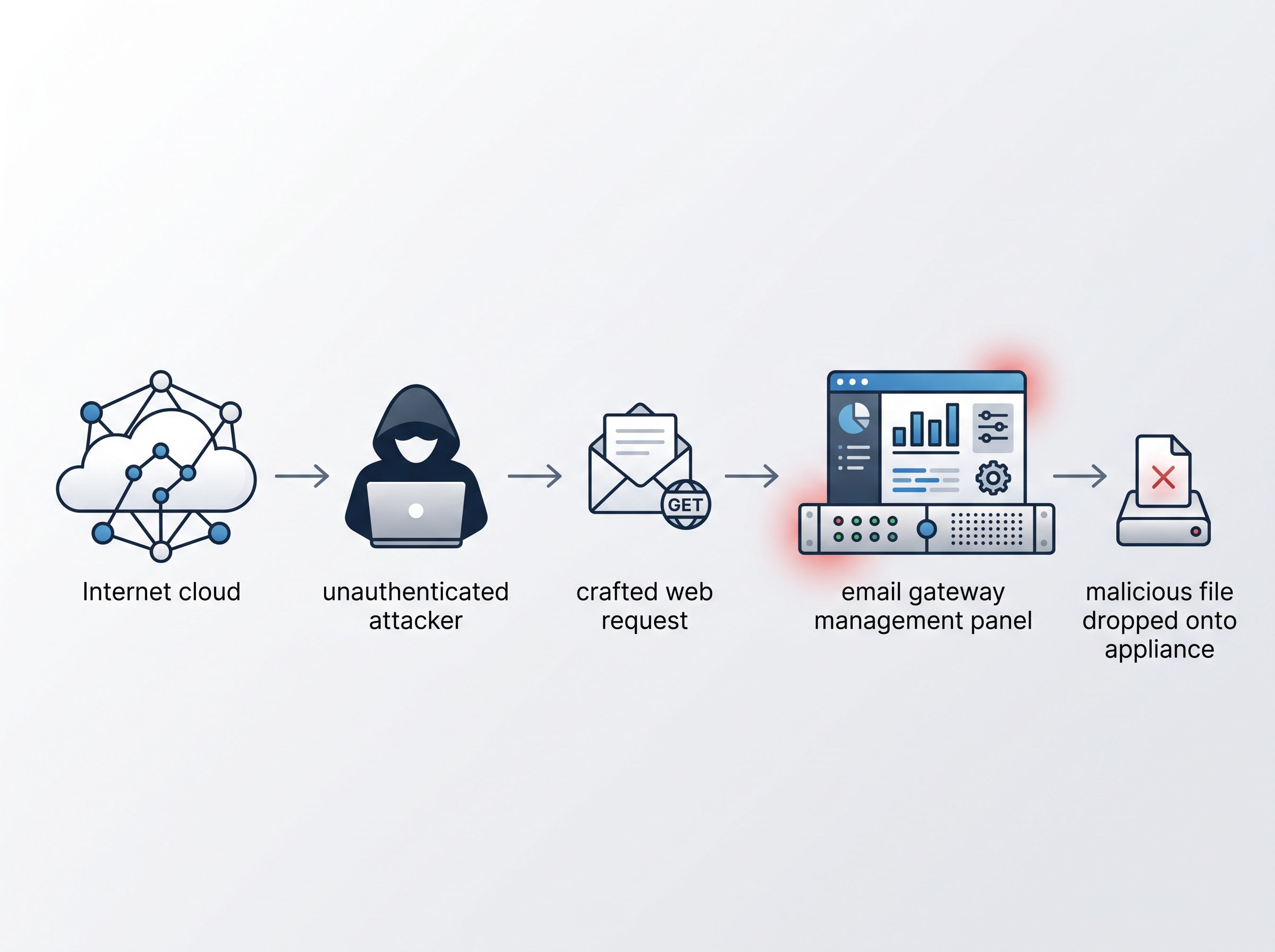
The vulnerability is a combination of a path traversal weakness and improper handling of a special NULL character. In plain terms, Fortinet warns that it “may allow an unauthenticated attacker to write arbitrary files on the underlying system via crafted HTTP or HTTPS requests.” Read that again: unauthenticated. An attacker needs no password, no stolen credential, and no help from a staff member — just the ability to reach the appliance and send it a specially formed web request. Being able to write files of your choosing onto a device is a short step from running your own code on it, which is how a flaw like this leads to full compromise.
It is already being used, and the fix is still catching up
This was disclosed as a zero-day — meaning attackers were exploiting it before any fix existed. Fortinet has published indicators of compromise, including specific malicious files planted on victim appliances and attacker-controlled internet addresses, and described how intruders quietly reconfigured compromised devices to exfiltrate data. CISA moved quickly, adding CVE-2026-104286 to its Known Exploited Vulnerabilities catalog and ordering US federal agencies to investigate and mitigate by October 4. When a government sets a same-week deadline, it is signalling that the threat is real and current, not theoretical.
The affected versions span FortiMail 7.2.0 through 7.2.9, 7.4.0 through 7.4.8, 7.6.0 through 7.6.6, and 8.0.0 through 8.0.1. Fortinet advises 7.2 users to upgrade to the 7.4 branch, but for the 7.4, 7.6, and 8.0 lines the patched releases were still listed as “upcoming” when the alert went out. In the meantime, administrators are urged to apply Fortinet’s workarounds — disabling the identity-based encryption (IBE) feature, and, just as importantly, removing access to the management interface from the public internet or restricting it to trusted internal networks.

“We don’t run FortiMail” — why this still matters to a practice
Many dental offices do not operate a FortiMail appliance directly. But the lesson lands close to home for three reasons.
First, Fortinet equipment is extremely common in the small-to-mid-size business and managed-service world. There is a reasonable chance that your practice, or the IT provider who supports you, runs some Fortinet device — a FortiGate firewall, a FortiMail gateway, or another appliance in the family. The only way to know is to ask.
Second, this is the same attack pattern we keep seeing: a critical, pre-authentication flaw not in an everyday app but in the very infrastructure built to protect a network. It is the identical shape as the Citrix NetScaler zero-days that let attackers seize remote-access gateways with no password, and the perfect-10 flaw in the N-central platform that IT providers use to manage client networks. The security and management tools that hold the keys are exactly the ones attackers most want to own.
Third, a compromised email gateway is uniquely dangerous to a healthcare practice. It processes a constant stream of patient-related correspondence — referrals, lab results, insurance, billing — and an attacker sitting on it can read that mail, harvest credentials, and send convincingly authentic phishing from a trusted internal source. Your attack surface is every internet-facing system you run, and a security appliance is a prize precisely because it is trusted.
What to actually do this week
You do not need to be a Fortinet administrator to take sensible action.
- Ask your IT provider the direct question. “Do we, or any system you manage for us, run FortiMail or any other Fortinet appliance? If so, is the management interface reachable from the internet, have the recommended workarounds been applied, and will it be patched the moment a fixed version ships?”
- Get management interfaces off the public internet. The core workaround here — restrict admin access to trusted internal networks — is good practice for every appliance, not just this one. No firewall, mail gateway, or router management page should be openly reachable from the internet.
- Check for compromise, not just version numbers. Because this was exploited before a patch existed, patching alone is not enough. Ask whether affected devices were checked against Fortinet’s published indicators of compromise for signs they were already breached.
- Put edge devices on a patch SLA. Public-facing security appliances deserve a defined, fast patching timeline. The gap between disclosure and exploitation is now measured in days — and in this case, exploitation came first.
- Keep humans sharp. If an email gateway can be bypassed or compromised, your staff become the last line of defense. Reinforce that even email that looks internal can be hostile.
The takeaway
CVE-2026-104286 is a sharp reminder that the tools we trust most to keep threats out can themselves become the entry point — and that a high-severity, no-password flaw under active attack, with no full patch yet, demands action measured in days, not quarters. The defenses that work are the unglamorous ones: knowing exactly which security appliances you run, keeping their management interfaces off the open internet, and verifying — rather than assuming — that they have not already been touched.

How Compudent Systems can help
At Compudent Systems, we help dental practices across the GTA and Ontario stay ahead of exactly this kind of risk — inventorying every internet-facing device and security appliance, locking management interfaces down to trusted networks, keeping firewalls and email gateways patched on a tight timeline, and checking for signs of compromise rather than hoping for the best. If you are not certain whether your practice runs an affected Fortinet device, or whether its admin interface is exposed to the internet right now, that uncertainty is the risk. Contact Compudent Systems for an email and perimeter security assessment, and let us make sure the devices guarding your inbox answer only to you.
Sources & further reading:
- Fortinet warns of critical FortiMail flaw exploited in zero-day attacks – BleepingComputer
- Critical FortiMail Zero-Day Flaw Exploited in Attacks Allows Unauthenticated Arbitrary File Writes – The Hacker News
- Exploited Fortinet FortiMail Zero-Day Calls for Urgent Action – SecurityWeek
Related Reading
- Critical FortiClient EMS Zero-Day CVE-2026-35616 Actively Exploited: Urgent Security Alert for Dental Practices
- One Logged-In Account Could Read the Whole Office’s Email: The Exchange Server Emergency Patch (CVE-2026-96940) Dental Practices Must Apply
- A Forged Login Walks Straight Into SharePoint: What the Actively Exploited CVE-2026-55040 Auth Bypass Means for Dental Practices